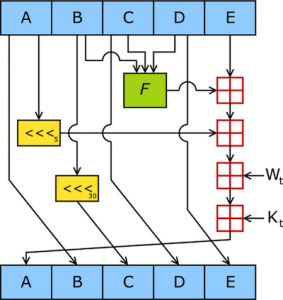
SHA1 is a pretty crucial part of my current startup, Ultralink. We need (relatively) decent uniqueness calculation and change detection, and need to be able to do it really, really quickly on a lot of content. We picked SHA1 because it’s widely supported, simple to implement, and fast. For the portions of Ultralink that run in Javascript, we needed to include CryptoJS, a third-party library. CryptoJS appears to be the go-to library for cryptographic functions in Javascript, and seemed to fit our bill perfectly. Development was humming along and everything was fine. When we would occasionally do performance passes and stress tests on desktop web browsers, the SHA1 calculation wasn’t even on the radar for perf offenders. Once we started taking a look on iOS devices though, specifically Mobile Safari, it became a completely different story… Read More →
A large number of the world’s wireless carriers enable internet tethering by default for no extra charge when using an iPhone (because data is just data after all). In the United States, no major carrier has had the good sense to do it even with data caps and throttling. Any way you look at it, paying for tethering is a bad deal. So what then are your options when you want to use your phone’s internet connection on your laptop? You can always jailbreak and enable iOS’s built-in tethering (marketed as “Personal Hotspot“) using a tweaked carrier profile or install a stanadlone tethering app. However, jailbreaking has known risks associated with it and some US carriers have stated that they will cut your service if they detect tethering without the requisite contract on their end (exactly what detection methods they employ and how much work they have invested in enforcement remains unclear). What then are we left with? Proxying. Read More →
CloudFlare is a popular, DNS-level proxy service that has layered on tons of useful features over the years like asset optimization and denial of service attack mitigation. Probably the most prominent service they provide though is caching. This caching functionality is primarily geared towards webpage content. Out of the box, CloudFlare’s caching settings work great and it intelligently decides what kind of files to cache (images, css, javascript) and what not to cache (html or other files that could contain dynamic content). You can tune CloudFlare’s settings to fit your specific needs and do a lot to lighten the load on your server. I started to think about all the interesting things I could do with a distributed caching layer that sits in front of my servers. I was designing the back end of ultralink.me at the time and thought: “Gee, CloudFlare might actually make a pretty decent read cache!“.
Now I have to start this article with some caveats. Using CloudFlare in this manner will not solve all your problems or even be appropriate in many cases. But if you do have a certain kind of workload and can expose the interface to your database in a specific way, it can really do a lot to absorb your database read traffic. Read More →
Some of you might have noticed that I haven’t written any blog posts here in a long while. That’s because I have been head down, cranking away on my latest exciting project. It is a very bold, new concept unlike anything that has been seen before. I call it the ‘Ultralink’.
To explain what an ultralink is, let’s first examine it’s ancestor, the hyperlink. The hyperlink is the most basic grammar of the internet. It’s assumptions and usage quickly permeate anyone who has used the web for more than five minutes. Even grandma knows what a hyperlink is and how to use it. I want to take that foundation and evolve it forward into something even more useful, more valuable and more user friendly. I want to re-write the most basic grammar of the internet.
The easiest way to understand what an ultralink is, is to go to https://ultralink.me and watch the introduction video there on the front page. Then install one of the browser extensions and take them for a test drive on any page on the internet.
We have finally decided to declare public beta and are now putting ourselves out there for all the world to use. We want feedback so that we can continually make our products more awesome. I would ask that you please take a look at the resources we have for ultralink above (and share/like/retweet/etc.), try them out for yourself and send me feedback on what you thought was awesome and what can be improved.
Hyperlinks still have their place, but ultralinks can do much of what they do better and some stuff they just can’t do at all. It’s the hyperlink… 2.0.
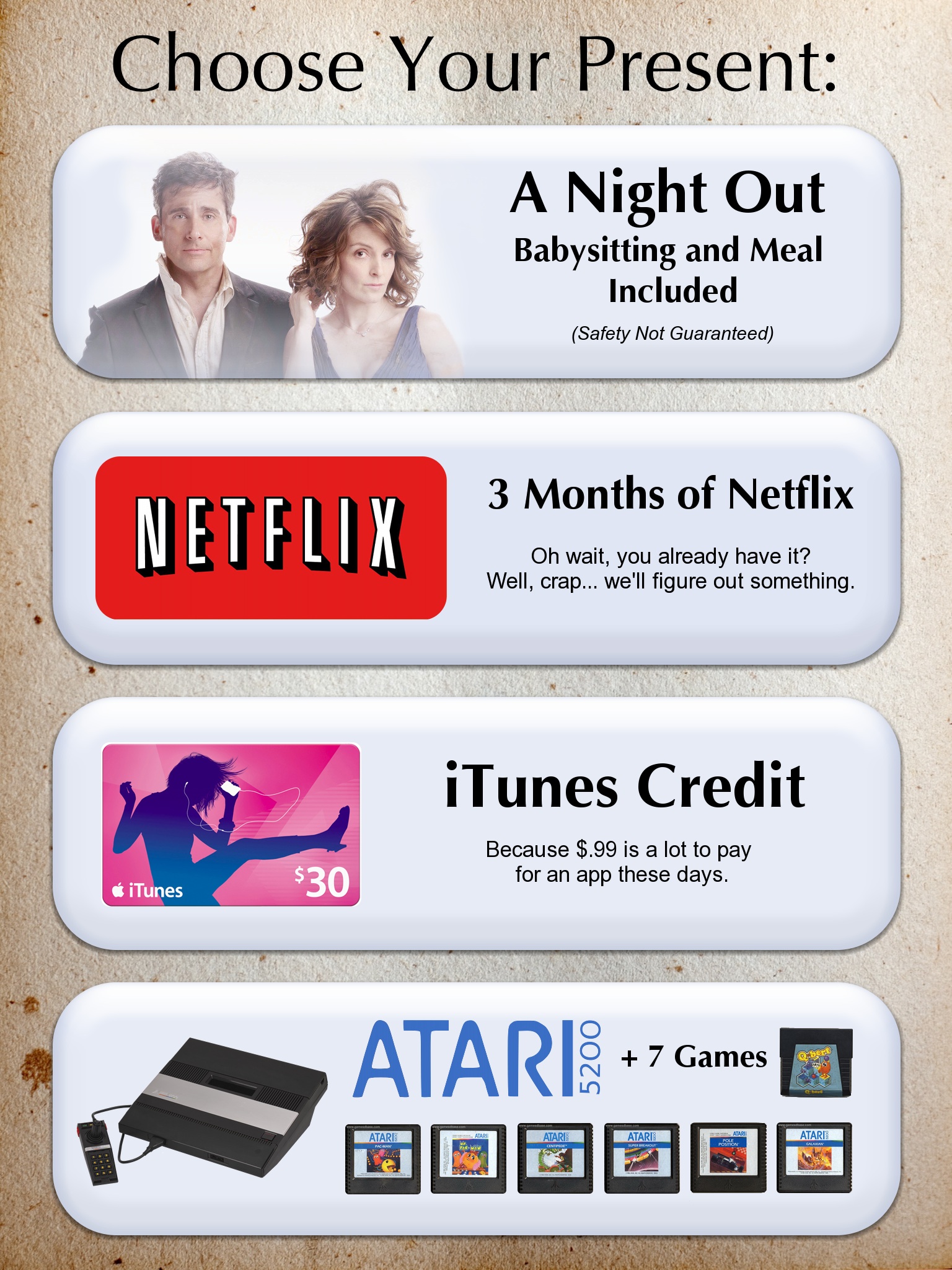
Both my own siblings and my wife’s siblings have had a Christmas present exchange for the past couple of years and although the gifts are never extravagant, we always try to make them thoughtful. This year we thought it might be fun to give our siblings a choice of which present they wanted. We thought of making a card with the various options printed on it but then I came up with the idea of making a custom app that could serve the same purpose.
But I didn’t want it to simply be a card analog. It would have to take advantage of some of the unique features of iOS and do things that a normal card could not. Maybe we could somehow sneak it on to their iPads without them even knowing and surprise them with it! I was really excited about the idea and so I immediately sat down and started cranking it out. Thus, Present.app was born. Read More →
It is always fun to try and guess what Apple is going to do next. You can guarantee that there will always be surprises and sure bets, letdowns and magical moments. The Apple rumor sites do a decent job of soliciting leaks, reading between the lines and making educated conjecture. As a developer, I often like to take a good look at where Apple’s technology is right now and make logical extrapolations as to where things are headed. Oftentimes, when Apple announces some new feature or technology it seems obvious in retrospect if we had only connected the dots. Based on 2011’s release schedule, it is a fair bet to say that Apple is going to announce iOS 6 at WWDC sometime this summer and distribute a developer beta. That means that in the coming months little trickles of information are going to get doled out to the rumor sites about what kind of changes and additions we can expect. Just for fun, I wanted to get my own predictions out in the open before any of that started. Here is my very developer-oriented prediction list of what we might be expecting in iOS 6.
UPDATE: WWDC and the iOS 6 beta have come and gone. Some of my predictions now have conclusions. You will notice however that most of the predictions have not yet been updated. That is because there is the potential for Apple to be keeping a few more surprises up their sleeve for the fall when iOS 6 goes GM. Inline below are the results so far.
UPDATE2: iOS 6 GM is here which means that the NDA has lifted! Check down below to see how well I did. Read More →
Here’s demo of the new 60beat GamePad with my friend Mike‘s game Caster HD. I added support to both Caster/Caster HD and the update has been submitted to the App Store for approval. It shouldn’t be too long before the update actually hits the App Store. (UPDATE: Both updates are now live on the App Store!)
In the video I demo the controls starting with the cursor. The Mac/Win/Linux version of Caster has game pad support for the in-game cursor and so it was easiest to just hook into that. You don’t need to worry about switching between touch and game pad controls. Caster has no on-screen control overlays and both control styles will work concurrently so you just plug in and go! No setting switch required.
After getting into the game I demonstrate the settings for the camera movement which is controlled by the right analog stick. The start button will pause the game and give you access to the options menu. There you can tweak the camera sensitivity and invert the axis if you want.
A lot of the other controls are doubled up so you can use whichever you prefer. The left analog stick or the directional pad control walking movement. Button 3 or R2 will jump. Button 4 or the R1 will fire. Buttons 1, 2 and L2 will rotate through the different weapons. By holding down L1 you initiate a dash when moving.
(While I’ve got you here, be sure to check out my new 3D physics shooter Invader Zurp if you haven’t already. It is a ton of fun and there is nothing else like in on the App Store. 🙂 )
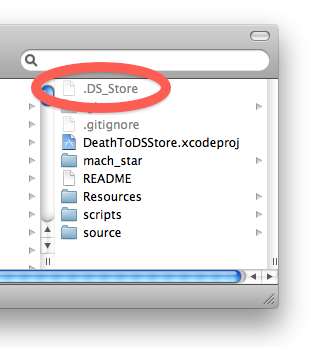
The “.DS_Store” file is an abomination and must be stopped. You know what I’m talking about. I regularly rant about how this annoying file gets in your way, dirties things up and just screws with your stuff in general. Today I decided to do something about it. Before we get to that, lets quickly review what it is and why it sucks.
What Is It?
The .DS_Store is a Finder metadata file created primarily by Mac OS X’s Finder.app. Because of the dot (“.”) prefix it is typically not visible in many file browsers and most Mac OS X users are probably not aware of it. It is regularly created when the Finder accesses filesystem directories. It contains directory information about icon locations, view options, silkscreen configuration and the like. The functionality that it provides is moderately useful, but becoming less and less relevant over time. In any case, a long time ago the horrible decision was made to store that Finder metadata in an actual file (.DS_Store) in the filesystem within the relevant directory. We have been paying for it ever since. Over time more and more metadata relating to files and the filesystem has been added to Mac OS X, but thankfully those have been stored in saner places (extended attributes, etc). For the time being though .DS_Store is still here with us and still causing trouble. What’s so harmful about the file you might ask?
Last September I wrote a blog post introducing Invader Zurp which revealed a little of the back story on how I came upon this new game idea after it’s first 2 months in development. Fast forward to 3 months later and Invader Zurp had just hit the App Store! I thought it would be useful to sit down and review the last 5 months of development, kind of plan out where I want to go from here and go over the events and insights that I thought were most influential during development.
The Story So Far…
So to recap the original blog post a bit, it was the middle of the summer (2011) and I had been working my brains out on Cannonade for the previous 6 months. I was a little discouraged at that point because progress wasn’t coming quite as quickly as I had hoped. Reception from my testers (just friends and family at that point) hadn’t been as positive as I had wanted either. I still had a very clear vision of what I wanted Cannonade to be and still believed that there is a ton of untapped potential for multiplayer-only games on iOS. But there was only so much I that could do as a one-man team and testing a multiplayer game can be quite time consuming. I took the family on vacation in early July and was able to step away from things for a while. It was then that I got an idea for a single player experience that distilled the core gameplay mechanic of Cannonade down to it’s essence. Thus Invader Zurp was born. Within two weeks I had modularized the Cannonade game engine, re-written the graphics sub-system in OpenGL ES 2.0 and had a working prototype. And it was fun! I found myself on very long “testing” sessions playing even after I had verified my fixes. I seeded the first alpha version in early September and wrote the introductory blog post. Then began the journey of finishing the game and kicking the darn thing out the door. Read More →
Aright it’s here! Invader Zurp, the project I have worked so hard on for the last 5 months is now for sale on the App Store! I want to thank all my wonderful testers for all their time they put into playing it and even more for the thoughtful and productive feedback that they so lavishly furnished on me. I couldn’t have done it without you!



 Spencer Nielsen